External PC/Steam guide
How to triangulate in Iron Nest
The short method
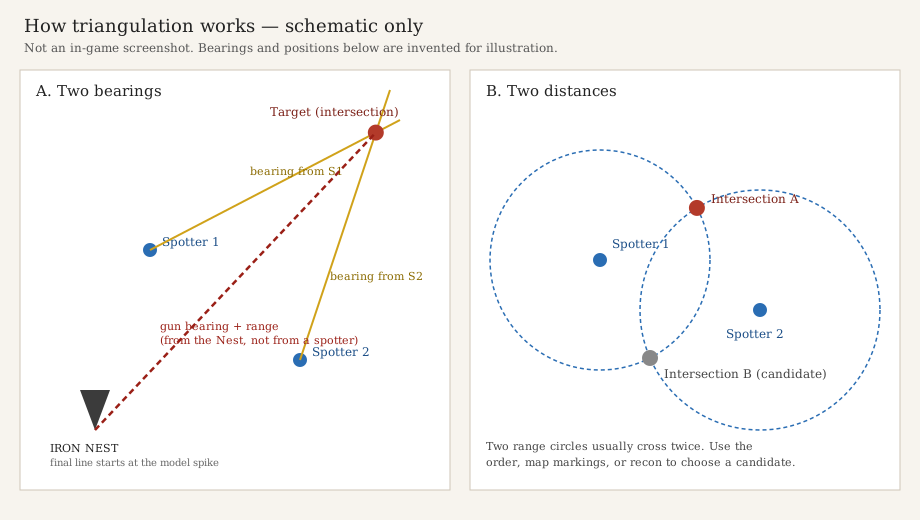
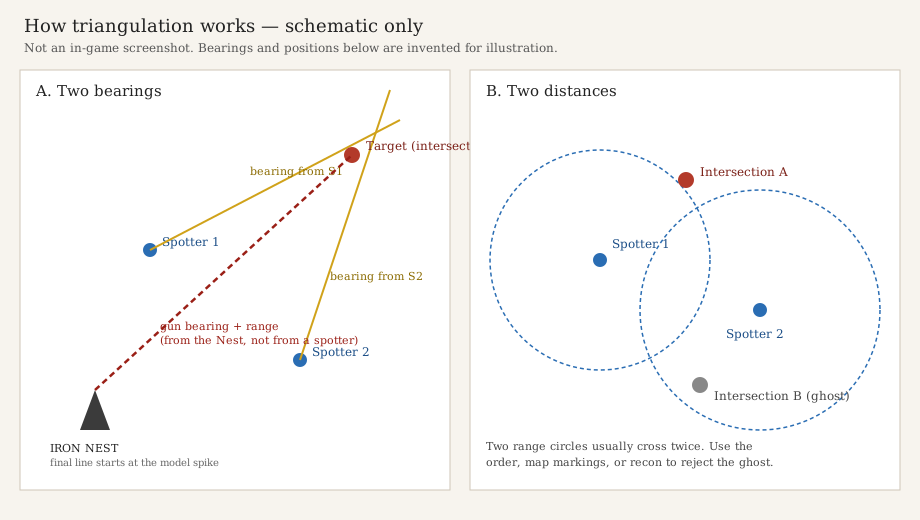
Plot the spotters first. For bearings, draw a direction line from each spotter and find the crossing. For ranges, draw circles centred on the spotters and resolve the two possible intersections. Then measure from the Nest to the target to obtain the gun’s bearing and range.
A spotter’s report is a clue to the target’s location, not a ready-made gun solution. The gun and the spotter are in different places. The official store describes procedural objectives, so there is no universal mission-coordinate answer key.
Tool instructions below are player-documented. Pencil colours, the compass, clipboard behaviour and model-spike origin come from RevanDerMetzger’s guide updated 16 June 2026, in the demo window before the August full release. Check your current interface; this is not an official manual or a verified set of current-version keybinds.
Read the reports and identify the tools
The official store describes teleprinters and map measurements from received coordinates. The demo-window player guide distinguishes High Command messages from spotter reports and says a highlighted message can be copied by clicking it. Keep the mission objective separate from the observer’s position and measurement.
The following tool descriptions are that player guide’s account:
- Yellow pencil: a plotting line with bearing and range, without clipboard copying.
- Red pencil: a bearing-and-range line associated with copying the fire mission to the clipboard.
- White pencil: a line without a bearing or range readout.
- Drafting compass: range circles. Demo-period discussion also calls it a “protractor”.
- Iris / splash tool: a separate aid for explosive effect, rather than the tool used to locate the target.
For positions, the guide describes a letter-number grid cell with sub-cell coordinates from 0,0 at bottom-left to 9,9 at top-right. Use the coordinates in your own report; none of the source author’s worked-example grids are reproduced here. Sources: RevanDerMetzger; 16 June Steam discussion.
Method A: intersect two bearings
- Mark each observer at the reported grid and sub-cell.
- From the first spotter, plot a line along the reported bearing. The demo-window guide uses the yellow pencil for plotting.
- Repeat from the second spotter, using that observer’s own bearing.
- Mark the crossing as your provisional target. Nearly parallel lines give a weak fix: a small directional error moves the crossing a long way, so seek another report if possible.
- Measure a new line from the Nest to that mark; do not reuse either observer’s bearing at the gun.
The crossing geometry is the method; the pencil colour is a demo-window UI detail from the player guide. Source: RevanDerMetzger.
Method B: resolve two range circles
- Mark each spotter, then draw a circle centred on each observer with a radius equal to that observer’s reported target range.
- Find the circle crossings. Two overlapping circles normally give two possible locations; distance alone does not choose between them.
- Compare both candidates with the actual order and map markings. Prefer a candidate supported by later recon or another observation.
- If the information still supports both, keep the fix provisional and seek another report instead of treating the first crossing as a confirmed target.
Post-launch players in the 20 August 2026 discussion often favour the crossing in marked enemy / red-zone territory. This is a player heuristic, not an official targeting rule. The same thread notes enemies can appear outside the marked area. A red-zone match is supporting context; additional observations are stronger confirmation. Sources: 20 August and 16 June Steam discussions.
Original teaching example: not mission answers
Invented geometry only: on a plain Cartesian teaching grid, place observers at A = (0, 0) and B = (6, 0), with a reported range of 5 arbitrary units from each. These are not Iron Nest grid coordinates, game metres, a mission key or our play data.
Both (3, 4) and (3, −4) are 5 units from each observer, so two ranges cannot distinguish them. An additional observer at C = (3, 8) reporting a range of 4 would select (3, 4); the other candidate is 12 units from C.
Once the target is chosen, a Nest at N = (−1, 1) would measure its own vector to the target: (4, 3), of length 5 in this example. That vector differs from either spotter’s line. The example assumes exact measurements to teach the geometry; it does not establish the game’s scale or spotting accuracy.
Turn the fix into a fire mission
Place a target mark, then take a fresh bearing and range from the Nest. RevanDerMetzger’s demo-window guide specifically says to start the red line at the spike at the bottom of the Nest model, rather than elsewhere on the artwork, and associates that red line with clipboard copying.
Use the resulting Nest-to-target measurement for the gun. Verify the current interface before relying on the colour, spike location or copy behaviour: those details have not been confirmed by an official manual or by our own testing. The separate iris / explosive-radius tool concerns munition effect, not the initial target fix. Source: RevanDerMetzger; 16 June discussion.
Scale, accuracy and version limits
Single-source figures: RevanDerMetzger describes each full grid cell as 1,000 × 1,000 metres and each sub-grid as 100 × 100 metres. The same author estimates spotting errors of about ±0.5 km and ±0.5 degrees. These are that author’s claims, not definite official rules; the pack contains no second independent confirmation of those values.
If circles fail to meet cleanly, check observer placement, copied ranges and units first. Another report may help resolve an uncertain fix. Do not treat the quoted error estimate as permission to assume an arbitrary target position.
Official Patch #9 news was posted on 31 October 2026 and its entry updated on 11 November. The research recovered the headline and timestamps, not the complete changelog. Post-launch discussion supports the circle method, but does not establish that every demo-window tool behaviour is unchanged. No keyboard or controller keybinds are asserted here.
Common stuck points
- Two intersections? Both may fit the ranges. Compare the mission, map context and further recon; red territory is a clue, not proof.
- Copied a spotter bearing and missed? Re-measure from the Nest. The observer and gun have different origins.
- A Nest-origin line still seems wrong? The demo-window guide specifies the model’s bottom spike; check your current interface.
- Circles do not touch? Recheck coordinates and units, then obtain more information. No official error tolerance was established.
- A published coordinate list fails? Objectives are procedural. Teaching examples are not a mission answer key.
Other external PC guides
These games are not hosted here: Winter Burrow story route to the feast · Desktop Explorer walkthrough. Browse the external PC/Steam guide group.
Sources and research boundaries
Sources reviewed for the research pack on 16 November 2026. No live in-game testing, official tool manual or complete Patch #9 changelog was available. The official store confirms measurements from received coordinates; it does not document pencil, compass, spike or clipboard behaviour.
- IRON NEST on Steam — Official tactical-map premise and procedural objectives. Full release 6 August 2026; demo 15 June 2026.
- Official Steam news: Patch #9 — Headline “New Skirmish Mission and Bug Fixes”, posted 31 October 2026; entry updated 11 November 2026. Headline and timestamps recovered, full changelog body unavailable.
- RevanDerMetzger: Iron Nest, an operator’s guide to the basics — Player guide last visibly updated 16 June 2026, in the demo window. Source for tool names, grid orientation, scale, spotting error, spike origin and clipboard behaviour; these are not official current-version controls.
- Steam discussion: which circle intersection? — 20 August 2026 post-launch player discussion. Several replies recommend enemy territory as a clue; the same thread notes exceptions. Steam’s short date omits the year, inferred in the pack from the full-release timeline.
- Steam discussion: range circles and “protractor” — 16 June 2026 demo-period player discussion; also distinguishes the separate explosive-radius tool.